What you will achieve
A dashboard with metrics and a trend or list, with verified refresh, empty states, and runtime access.
Before you begin
- PlgBigScreen installed with access to /bigscreen.
- An accessible data source and real response sample; validate SQL datasets in DynamicData first.
01 · Plan the reading order
- Define three essential metrics, such as online devices, active exceptions, and current load, including units and aggregation rules.
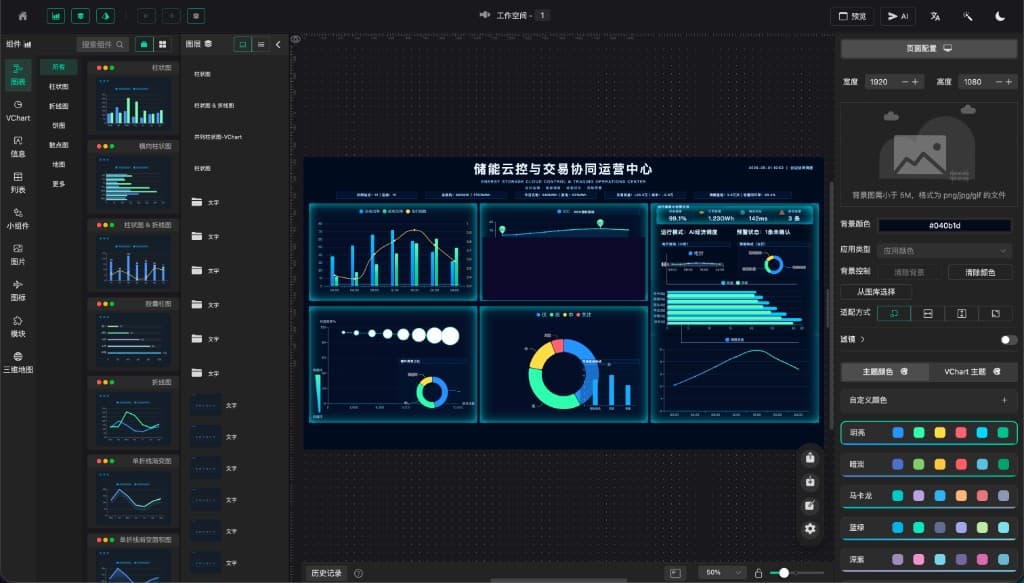
- Create the project and arrange top metrics, a central trend, and a lower exception list for the target screen.
Expected result
Viewers can quickly find operating status and exceptions.
02 · Verify the response shape
- Preview the source/dataset and record field names, types, and the timestamp field.
- Choose a supported data source in each component and map the actual response path, including the array level for lists and charts.
- Set a suitable refresh interval and inspect empty/error states. Keep credentials in server-side source configuration.
Expected result
Components consume the actual fields rather than fixed sample values.
03 · Check presentation and navigation
- Align heading hierarchy, units, and time ranges so charts and metrics use consistent aggregation.
- Link only existing, permitted runtime views and check text, clipping, and scrolling at the target resolution.
Expected result
Metrics are understandable and links reach the intended views.
04 · Save and verify runtime access
- Save and reopen the project, then use the plugin’s preview/runtime entry.
- Associate navigation with the saved project’s actual ID; do not substitute a display name for a file path.
- Observe several refresh cycles as a viewer and test empty responses and recovery.
Expected result
Runtime refreshes and clearly distinguishes missing data from healthy current values.
Troubleshooting
Chart frame appears without data
Check array shape, field casing, response path, and timestamp format. Isolate the source with one metric first.
The list opens but runtime cannot find the project
Check project ID, successful save, view association, and permissions using the project list’s runtime link.